

The Experiments section in GrowthBook is all about analyzing raw experiment results in a data source. Before analyzing results, you need to actually run the experiment. This can be done in several ways:Documentation Index
Fetch the complete documentation index at: https://growthbook-preview.mintlify.app/llms.txt
Use this file to discover all available pages before exploring further.
- Feature Flags (most common)
- Running an inline experiment directly with our SDKs
- Our Visual Editor (beta)
- Your own custom variation assignment / bucketing system
Experiment Splits
When you run an experiment, you need to choose who will get the experiment, and what percentage those users should get each variation. In GrowthBook, we allow you to pick overall exposure percentage, as well as customize the split per variation. Yor can also target an experiment at just some attribute values. GrowthBook uses deterministic hashing to do the assignment. That means that each user’s hashing attribute (usually user id), and the experiment name, are hashed together to get a number from 0 to 1. This number will always be the same for the same set of inputs. There is quite often a need to de-risk a new A/B test by running the control at a higher percentage of users than the new variation, for example, 80% of users get the control, and 20% get the new variation. To solve this case, we recommend keeping the experiment spits equal, and adjusting the overall exposure (ie, 20% exposure, 50/50 on each variation, so each variation gets 10%). This way the overall exposure can be ramped up (or down) without having any users potentially switch variations.Metric selection
GrowthBook lets you choose goal metrics, secondary metrics, and guardrail metrics. Goal metrics are the metrics you’re trying to improve or measure the impact of the change of your experiment. Secondary metrics are used to learn about experiment impacts, but are not primary objectives. Guardrail metrics are metrics you’re trying not to hurt.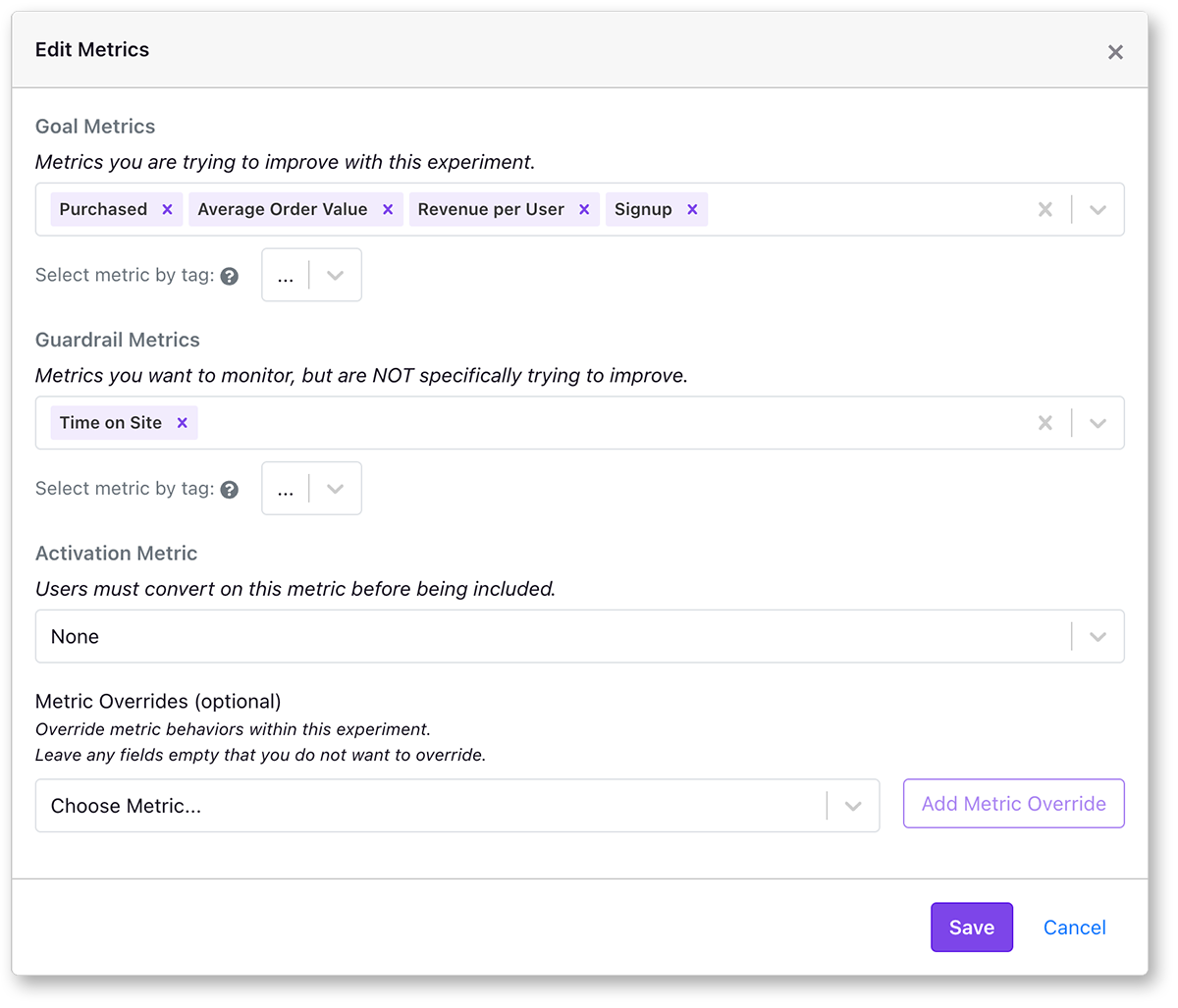
Activation metrics
Assigning your audience to the experiment should happen as close to the test as possible to reduce noise and increase power. However, there are times when running an experiment requires that users be bucketed into variations before knowing that they are actually being exposed to the variation. One common example of this is with website modals, where the modal code needs to be loaded on the page with the experiment variations, but you’re not sure if each user will actually see the modal. With activation metrics you can specify a metric that needs to be present to filter the list of exposed users to just those with that event.Sample sizes and metric totals
When running an experiment you select your goal metrics. Getting enough samples depends on the size of the effect you’re trying to detect. If you think the experiment will have a large effect, the smaller total number of events you need to collect. GrowthBook allows users to set a minimum metric total for each metric where we will hide results before that threshold is reached to avoid premature peeking.Test Duration
We recommend running an experiment for at least 1 or 2 weeks to capture variations in your traffic. Before a test is significant, GrowthBook will give you an estimated time remaining before it reaches the minimum thresholds. Traffic to your product is likely not uniform, and there may be differencesMetric Windows
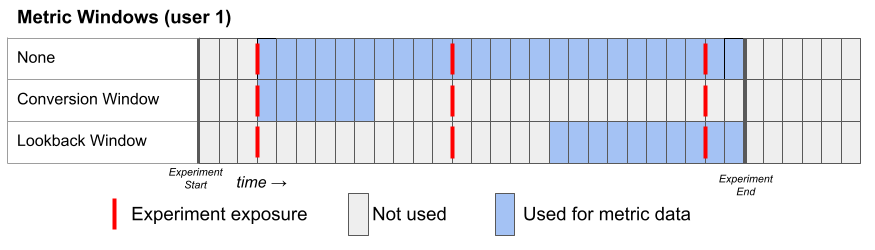
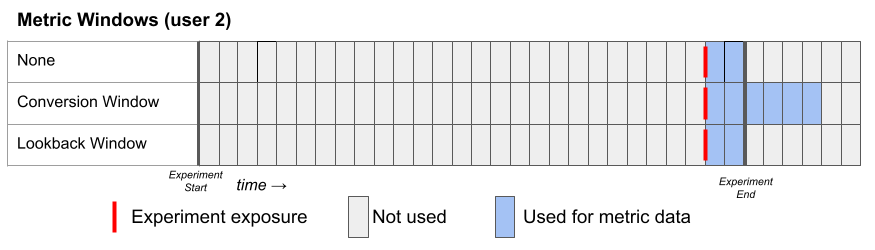
A lot can happen between when a user is exposed to an experiment, and when a metric event is triggered. How you want to attribute that conversion event to the experiment is adjustable within GrowthBook using metric and experiment level settings. At the metric level, you can pick three different metric windows:- None - uses as much data as possible from the user’s exposure until the end of the experiment.
- Conversion - uses only data in some window after a user’s first exposure. If the metric’s conversion window is set to 72 hours, any conversion that happens after that is ignored.
- Lookback - uses only data in the last window before an experiment ends.
Understanding results
Bayesian Results
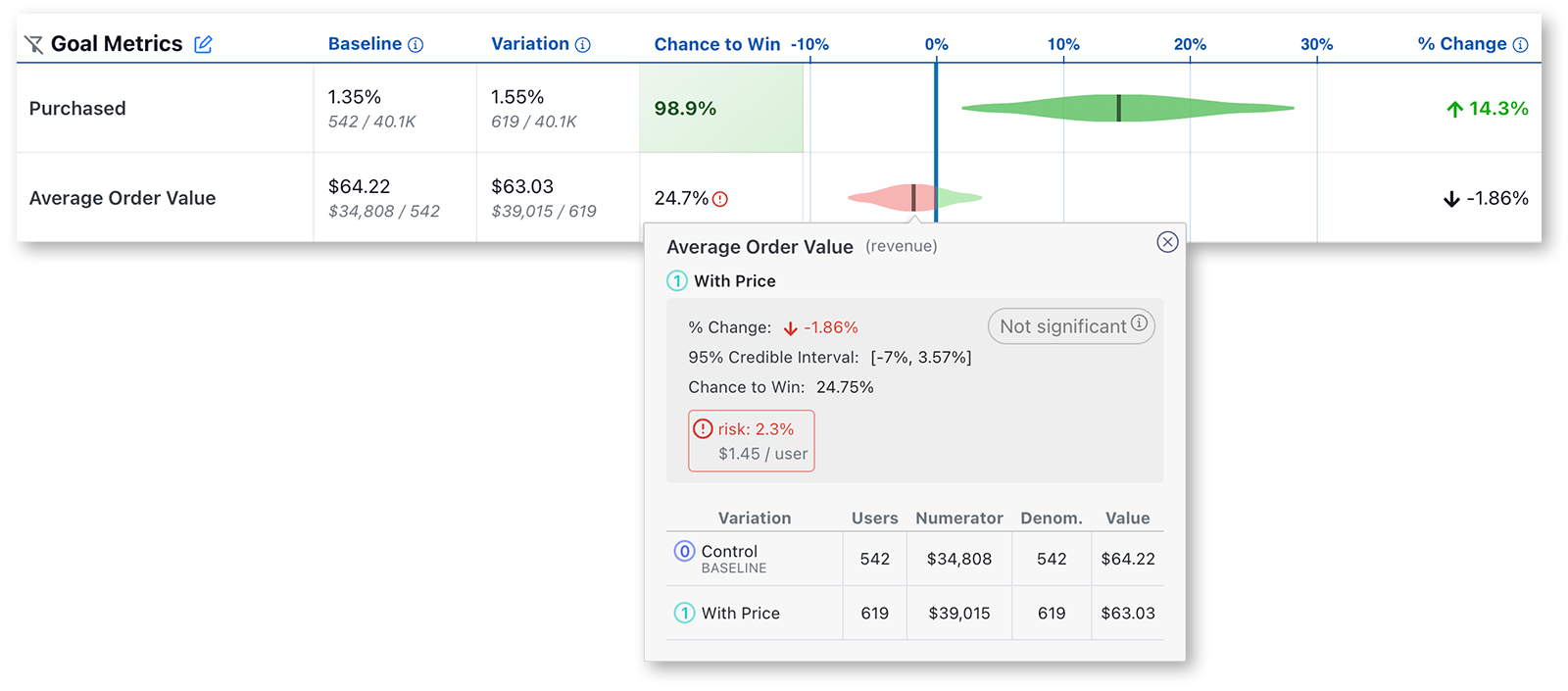
In GrowthBook the experiment results will look like this.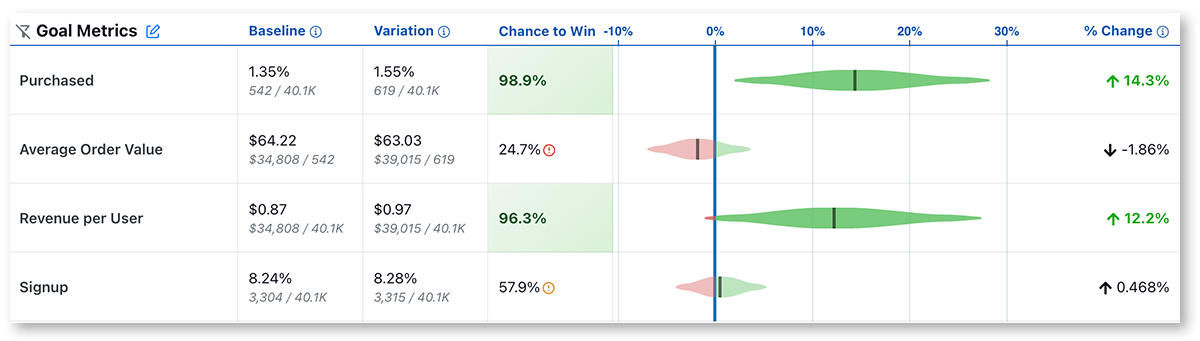
Frequentist Results
You can also choose to analyze results using a Frequentist engine that conducts simple t-tests for differences in means and displays the commensurate p-values and confidence intervals. If you selected the “Frequentist” engine, when you navigate to the results tab to view and update the results, you will see the following results: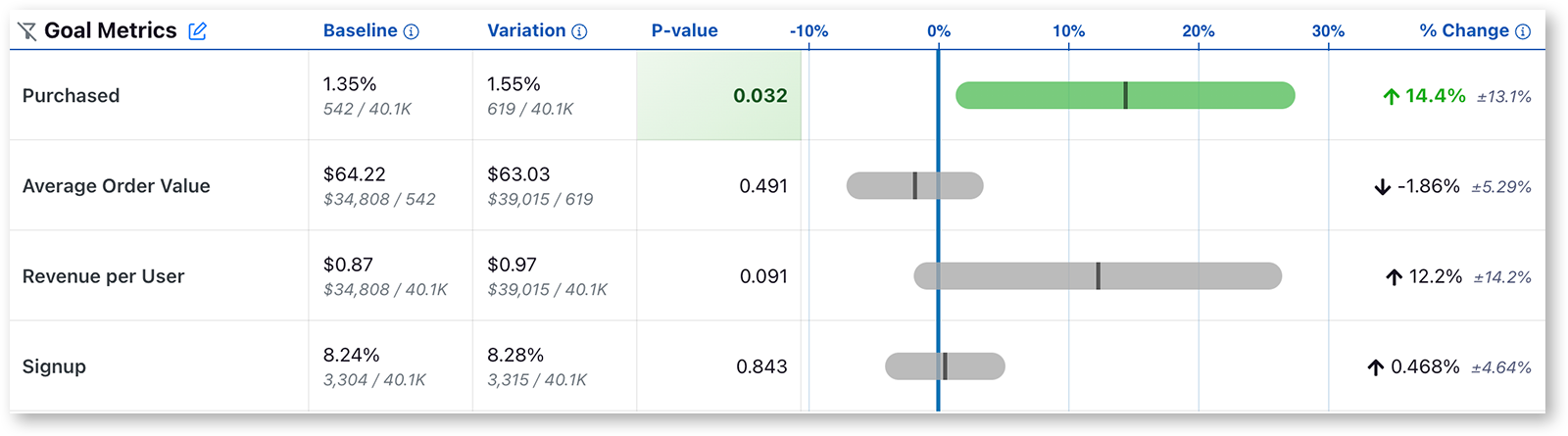
- The Chance to Beat Control column has been replaced with the P-value column. The p-value is the probability that the percent change for a variant would have been observed if the true percent change were zero. When the p-value is less than the threshold (default to 0.05) and the percent change is in the preferred direction, we highlight the cell green, indicating it is a clear winner. When the p-value is less than the threshold and the percent change is opposite the preferred direction, we highlight the cell red, indicating the variant is a clear loser on this metric.
- We now present a 95% confidence interval rather than a posterior probability density plot.
Data quality checks
GrowthBook performs automatic data quality checks to ensure the statistical inferences are valid and ready for interpretation. You can check and monitor the health of your experiments on the experiment health page.Health Page
GrowthBook automatically does data quality checks on all experiments and shows the results on the Health Page.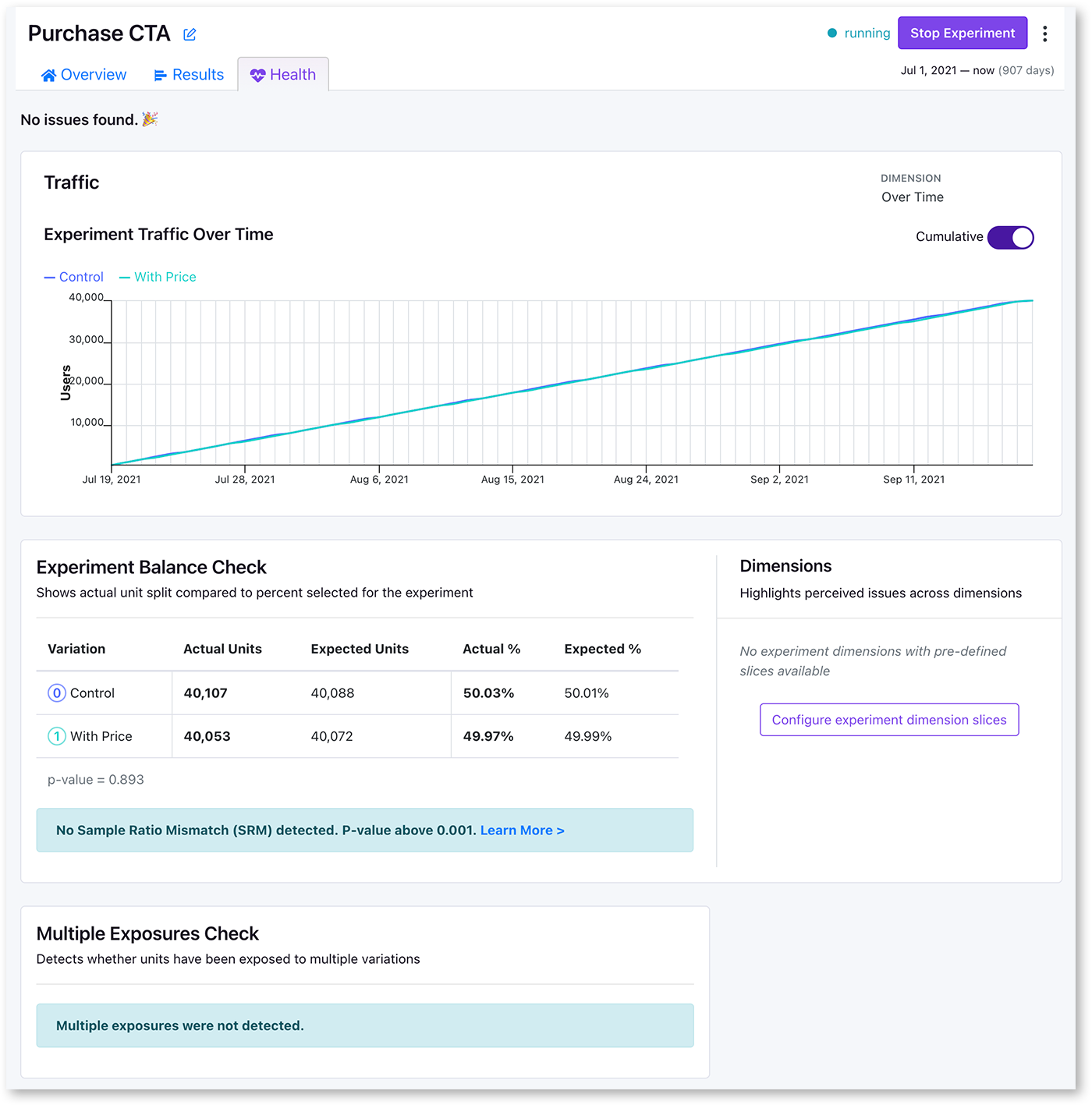
Little traffic in experiment
Experiment Traffic Over Time shows how many users are in the experiment at a given timepoint. If traffic is too low, please see our troubleshooting guide.Sample Ratio Mismatch (SRM)
Every experiment automatically checks for a Sample Ratio Mismatch and will warn you if found. This happens when you expect a certain traffic split (e.g. 50/50) but you see something significantly different (e.g. 46/54). We only show this warning if the p-value is less than 0.001, which means it’s extremely unlikely to occur by chance. We will show this warning on the results page, and also on our experiment health page.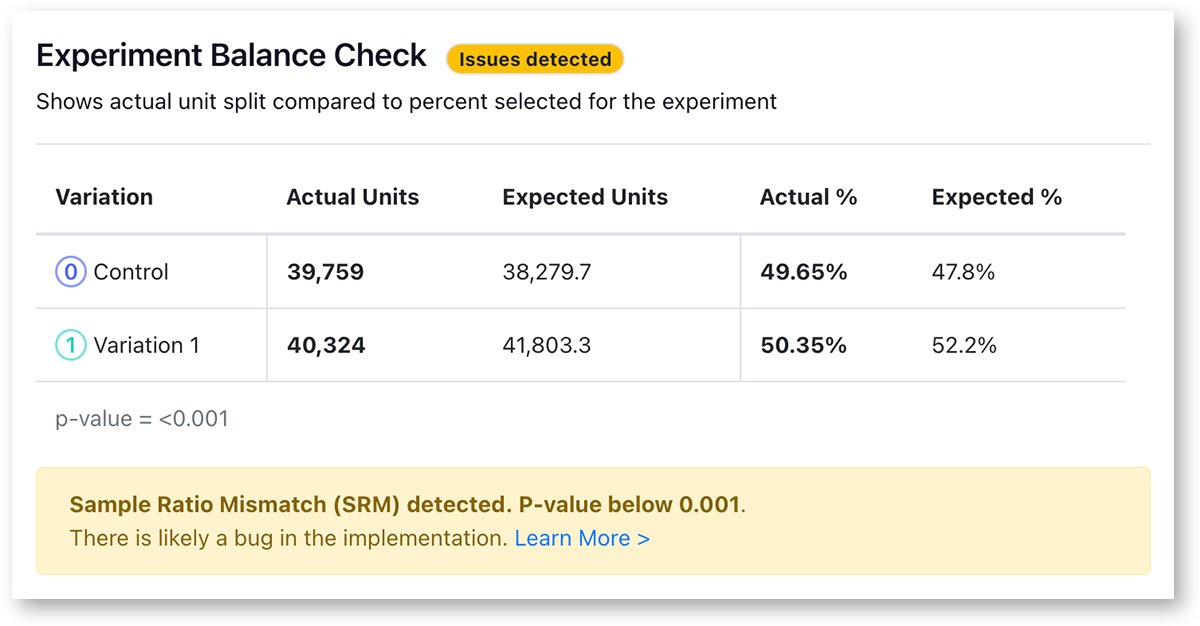
Multiple Exposures
We also automatically check each experiment to make sure that too many users have not been exposed to multiple variations of a single experiment. This can happen if the hashing attribute is different from the assignment id used in the report, or for implementation problems. Please see our troubleshooting guide.Minimum Data Thresholds
You can set thresholds per metric to make sure people viewing the results aren’t drawing conclusions too early (e.g. when it’s 5 vs 2 conversions)Variation Id Mismatch
GrowthBook can detect missing or improperly-tagged rows in your data warehouse. The most common way this can happen if you assign with one parameter, but send a different ID to your warehouse from the trackingCallback call. It may indicate that your variation assignment tracking is not working properly.Suspicious Uplift Detection
You can set thresholds per metric for a maximum percent change. When a metric results is above this, GrowthBook will show an alert. Large uplifts may indicate a bug - see Twymans Law.Guardrails
Guardrail metrics are ones that you want to keep an eye on, but aren’t trying to specifically improve with your experiment. For example, if you are trying to improve page load times, you may add revenue as a guardrail since you don’t want to inadvertently harm it. Guardrail results show up beneath the main table of goal and secondary metrics. The full statistics are shown like goal metrics, and similarly they are colored based on “Chance to Beat Control”. If guardrail metrics become significant, you may want to consider ending the experiment.
Digging deeper
GrowthBook lets you dig into the results to get a better understanding of the likely effect of your change.Segmentation
Segments are applied to experiment results to only show users that match a particular attribute. For example, you might have “country” as a dimension, and create a segment for just “US visitors”. In the experiment you can configure the experiment to just look at one particular segment of users. Segments can be created with SQL from the “Data and Metrics → Segments” page.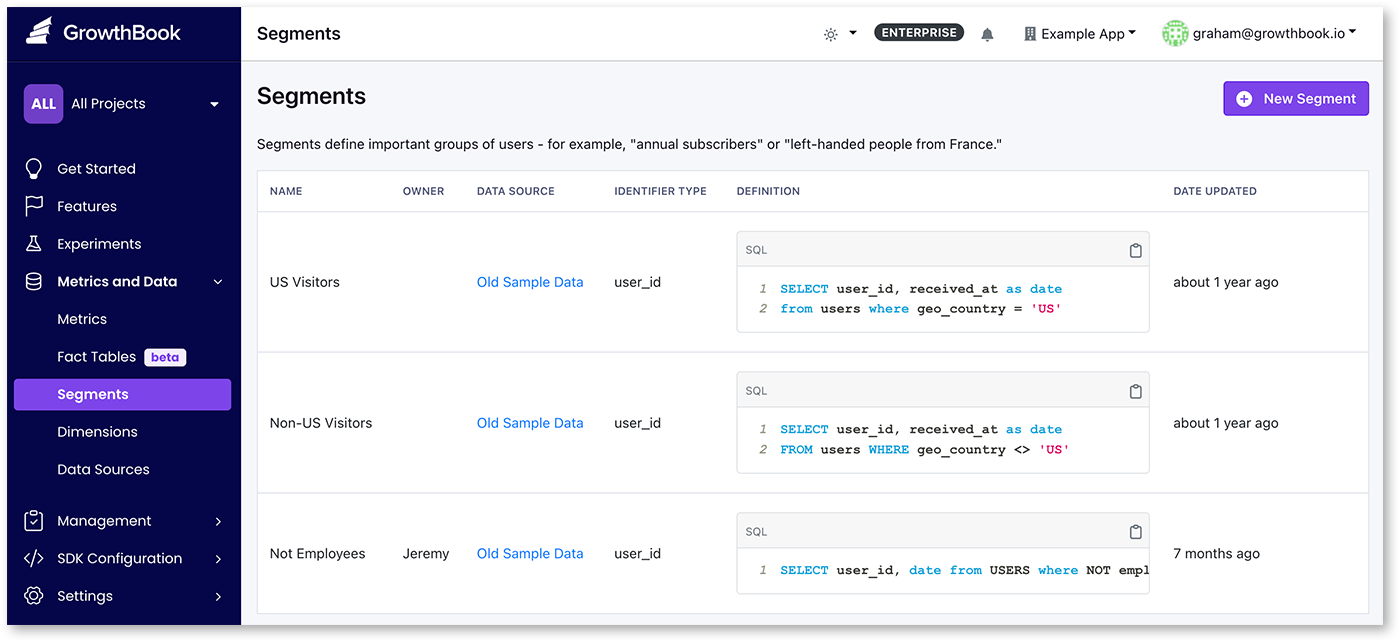
Dimensions
GrowthBook lets you break down results by any dimension you know about your users. We automatically let you break down by date, and any additional dimensions can be added either with the exposure query, or with custom SQL from the dimension menu. Some examples of common dimensions are “Browser” or “location”. You can read more about dimensions here.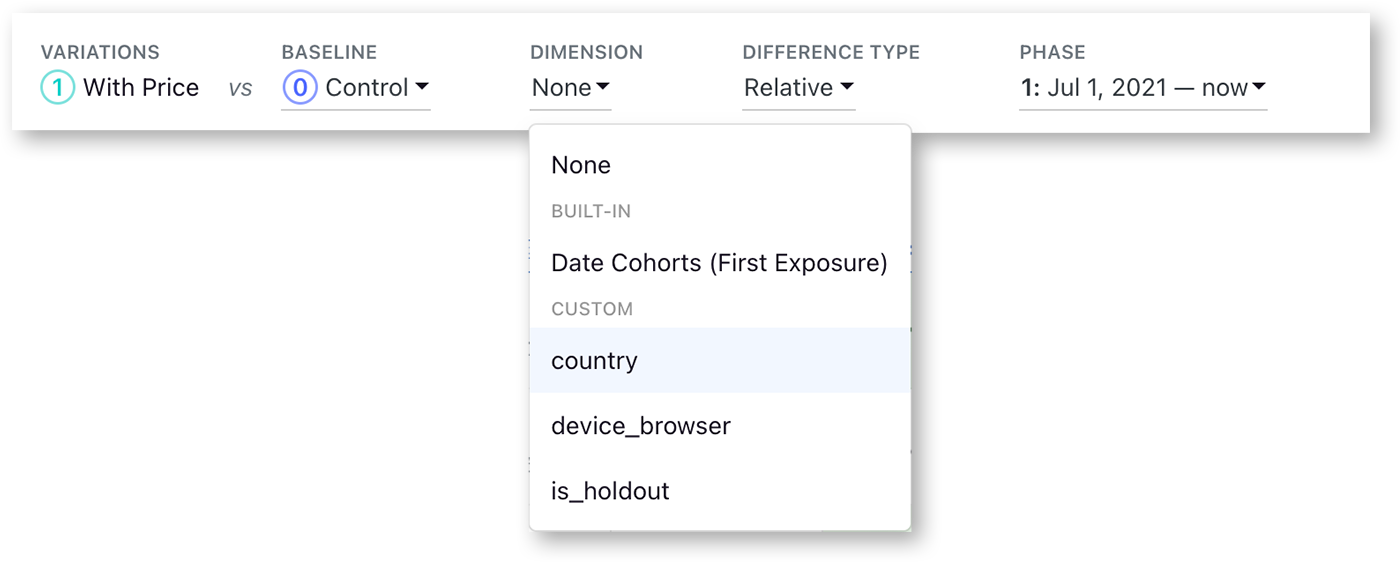
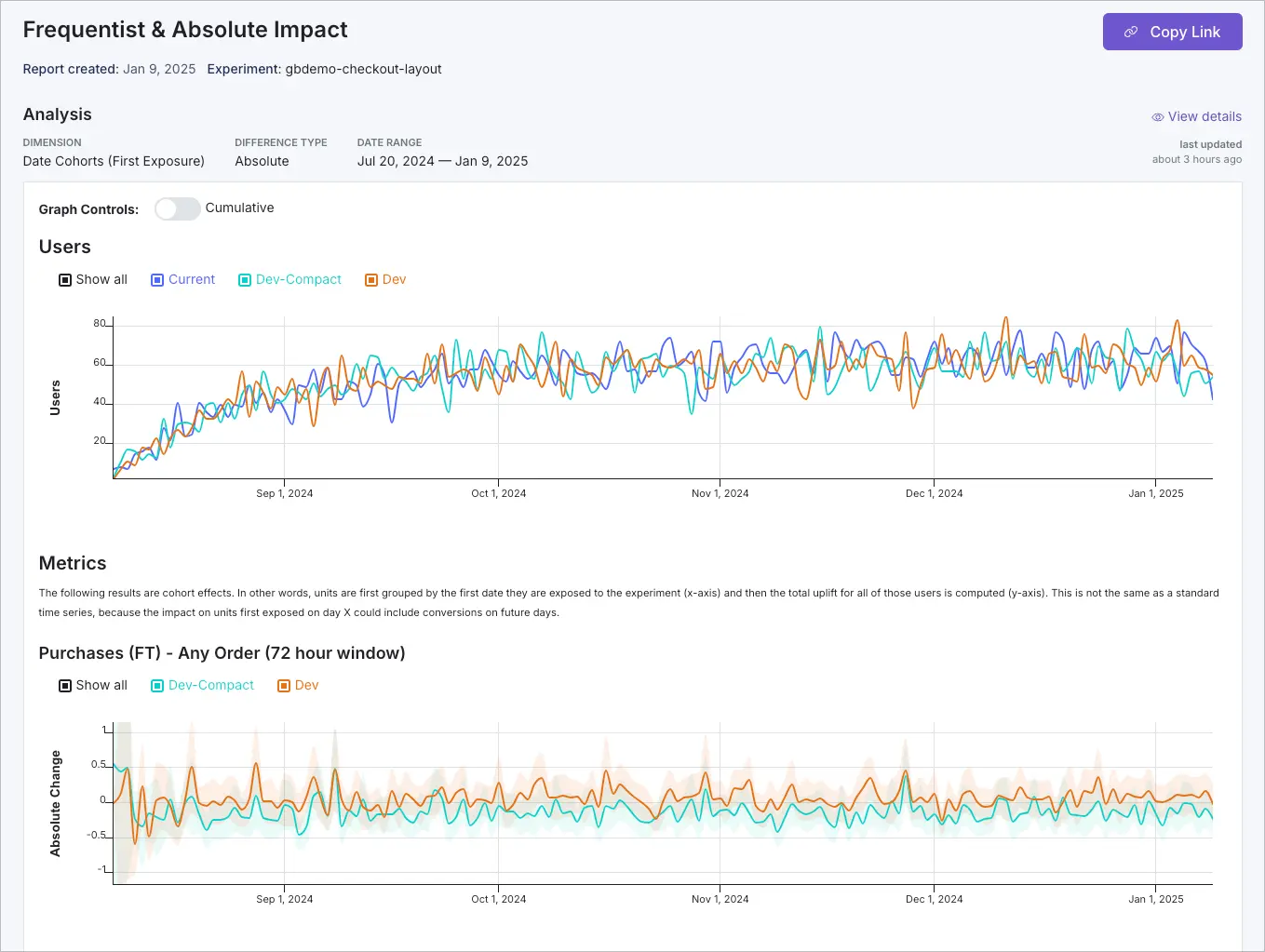
Custom reports
Custom reports create snapshots of experiment results, allowing you to capture and share specific analyses or points in time. Common use cases for custom reports include:- Capturing milestone results at specific points in the experiment
- Analyzing specific date ranges or segments
- Adding or removing metrics for focused analysis
- Applying custom SQL filters to handle outliers
- Creating targeted views for different stakeholders
- Documenting key findings for future reference
Deciding A/B test results
Hopefully you are analysing your experiment results with your OEC already documented. Even so, when to stop, and how to interpret results may not be straight forward.When to stop an experiment
When using the Bayesian statistics engine, there are a few methods you can use when stopping a test.- significance reached on your primary metrics
- confidence intervals do not include harmful outcomes
- guardrail metrics are not affected
- test duration reached