

Documentation Index
Fetch the complete documentation index at: https://growthbook-preview.mintlify.app/llms.txt
Use this file to discover all available pages before exploring further.
Exposure Tracking
For client side testing, you can fire a custom track event from the GrowthBook SDK’strackingCallback function, like so:
Integrating with Amplitude Data
For GrowthBook to integrate with Amplitude you first must export your Amplitude data to the data warehouse of your choice. You can read more about it on Amplitudes help pages. Currently, Amplitude supports exporting to Redshift, Snowflake, BigQuery, and S3 (and use Athena). Once you have set up a data export to one of these destinations, you can connect GrowthBook to it.GrowthBook won’t automatically create SQL queries for Amplitude, but you can follow the general instructions below. If you need any help, reach out to us and we can help
Configuration Settings
Once you have chosen your event tracker and data source type and successfully connected, you will be given an opportunity to modify your configuration settings. For many applications GrowthBook will have chosen the correct configuration settings straight out of the box based upon which event tracker you choose. In some instances you may need to tweak them slightly, or in the case of using a custom datasource, define them more explicitly.Identifier Types
These are all the types of identifiers you use to split traffic in an experiment and track metric conversions. Common examples areuser_id, anonymous_id, device_id, and ip_address.
Experiment Assignment Queries
An experiment assignment query returns which users were part of which experiment, what variation they saw, and when they saw it. Each assignment query is tied to a single identifier type (defined above). You can also have multiple assignment queries if you store that data in different tables, for example one from your email system and one from your back-end. The end result of the query should return data like this:| user_id | timestamp | experiment_id | variation_id |
|---|---|---|---|
| 123 | 2021-08-23-10:53:04 | my-button-test | 0 |
| 456 | 2021-08-23 10:53:06 | my-button-test | 1 |
user_id. If you are using a different identifier, you would use a different column name.
Here’s an example query you might use:
SELECT original_column as new_column).
Duplicate Rows
If a user sees an experiment multiple times, you should return multiple rows in your assignment query, one for each time the user was exposed to the experiment. This helps us detect when users were exposed to more than one variation, and eventually may be useful in helping build interesting time series.Experiment Dimensions
In addition to the standard 4 columns above, you can also select additional dimension columns. For example,browser or referrer. These extra columns can be used to drill down into experiment results.
Identifier Join Tables
If you have multiple identifier types and want to be able to auto-merge them together during analysis, you also need to define identifier join tables. For example, if your experiment is assigned based ondevice_id, but the conversion metric only has a user_id column.
These queries are very simple and just need to return columns for each of the identifier types being joined. For example:
SQL Template Variables
Within your queries, there are several placeholder variables you can use. These will be replaced with strings before being run based on your experiment. This can be useful for giving hints to SQL optimization engines to improve query performance. The variables are:- startDate -
YYYY-MM-DD HH:mm:ssof the earliest data that needs to be included - startYear - Just the
YYYYof the startDate - startMonth - Just the
MMof the startDate - startDay - Just the
DDof the startDate - startDateUnix - Unix timestamp of the startDate (seconds since Jan 1, 1970)
- endDate -
YYYY-MM-DD HH:mm:ssof the latest data that needs to be included - endYear - Just the
YYYYof the endDate - endMonth - Just the
MMof the endDate - endDay - Just the
DDof the endDate - endDateUnix - Unix timestamp of the endDate (seconds since Jan 1, 1970)
- experimentId - Either a specific experiment id OR
%if you should include all experiments
'{{ startDate }}' instead of just {{ startDate }})
Jupyter Notebook Query Runner
This setting is only required if you want to export experiment results as a Jupyter Notebook. There is no one standard way to store credentials or run SQL queries from Jupyter notebooks, so GrowthBook lets you define your own Python function. It needs to be calledrunQuery, accept a single string argument named sql, and return a pandas data frame.
Here’s an example for a Postgres (or Redshift) data source:
Schema Browser
When you connect a supported data source to GrowthBook, we automatically generate metadata that is used by our Schema Browser. The Schema Browser is a user-friendly interface that makes writing queries easier as you can easily explore information about the datasource such as databases, schemas, tables, columns, and data types.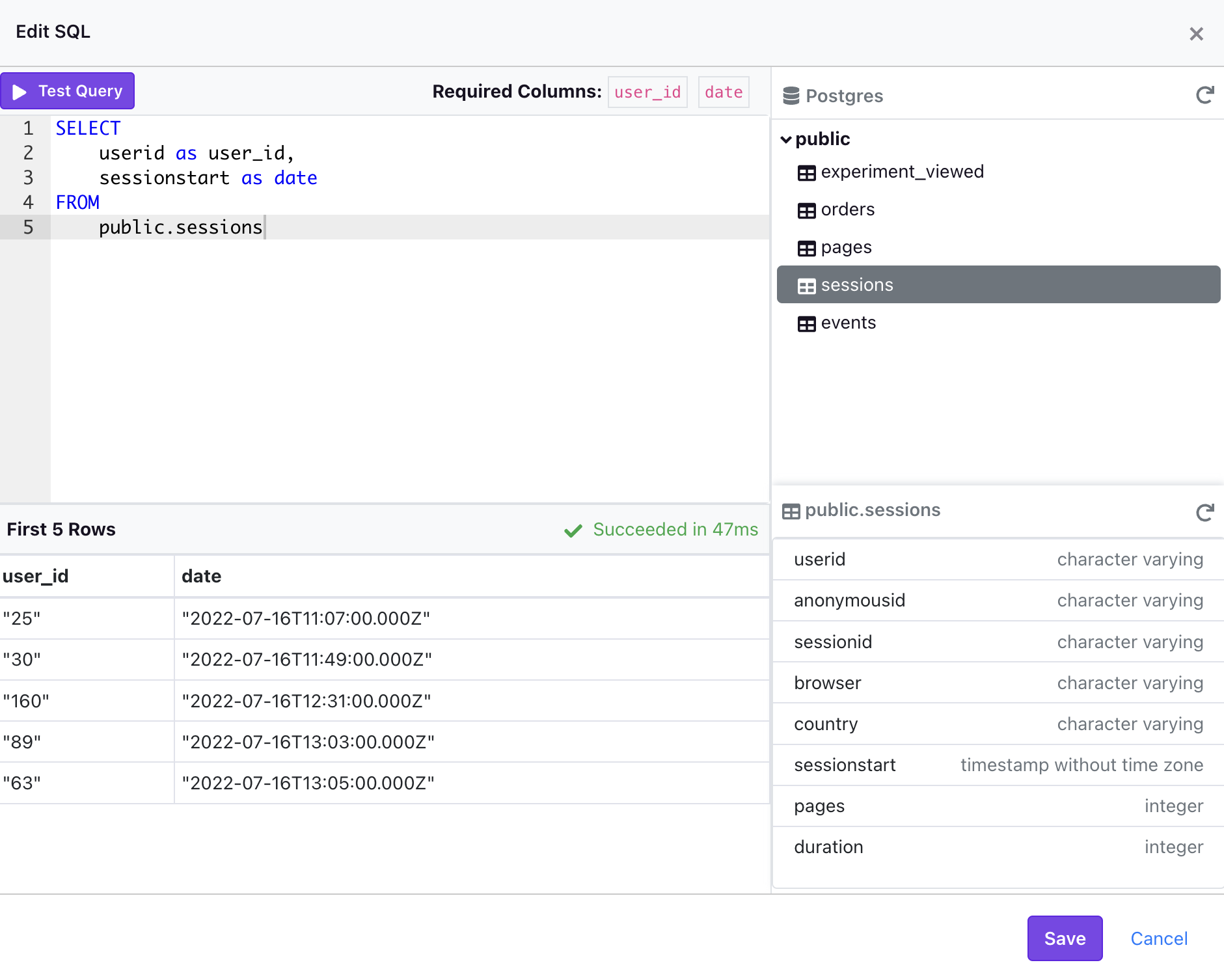
- AWS Athena - Requires a Default Catalog
- BigQuery - Requires a Project Name and Default Dataset
- ClickHouse
- Databricks - Currently only supported on version 10.2 and above with a Unity Catalog
- MsSQL/SQL Server
- MySQL/MariaDB
- Postgres
- PrestoDB (and Trino) - Requires a Default Catalog
- Redshift
- Snowflake